
Can AI help with tool validation?
A large language model (LLM) can help embedded teams validate their tools. It can draft your requirements, surface what might go wrong, write the test scaffolding, and assemble the evidence. What it can’t do is finish the job.
Bringing an LLM anywhere near validation sounds like the wrong idea in safety-adjacent work, but the reality is that some teams don’t validate their tools at all. Within a formal QMS framework, such as ISO 13485 and 21 CFR Part 820, tool validation is mandatory, so it occurs. Everywhere else, a static analyser or a code generator earns its place on first impression and keeps it indefinitely, even if it flags a bug that isn’t there, or misses one that is. Why? Because most teams rarely formally check whether their tools do what they’re trusted to do.
What is tool validation?
Tool validation (sometimes referred to as tool qualification) confirms that a development tool does what you rely on it to do and produces the evidence to prove it.
IEC 62304 (the standard for medical device software) requires the tools used to develop your software to be controlled, but leaves the method of qualifying them to you. Other standards, such as DO-330 in aerospace and ISO 26262 in automotive, formalise their own qualification levels.
Under ISO 13485 (the quality management system standard behind most medical device work), validating software used in your quality system or production is a direct requirement.
| Stage | Name | Purpose |
|---|---|---|
| 1 | Intended use and risk | Define how the tool is used, and how risky its failure would be. |
| 2 | Validation plan | Set the scope, roles, and acceptance criteria before testing starts. |
| 3 | Requirements | Document exactly what the tool needs to do. |
| 4 | Execution and testing | Test it against those requirements, scoped to how it’s actually used. |
| 5 | Traceability matrix | Map every requirement to the test that proves it. |
| 6 | Validation report | Summarise the results and make the case for release. |
| 7 | Maintain validated state | Reassess whenever the tool, or your use of it, changes. |
The stages aren’t equal when it comes to AI’s usefulness and instead follow a curve — lowest at both ends, highest through the middle. Defining intended use and assessing risk is a judgment call at the start; deciding whether a change means you need to re-test is a judgment call at the end. In between, the work leans more toward applying a decision that’s already been made. Let’s look at exactly where AI can help at each stage of the validation process.
Where AI helps, stage by stage
1. Intended use and risk
Moderate impact – Useful for a first pass, but the risk call is always yours.
Defining intended use and assessing risk are fundamentally judgment calls, not lookups. An LLM can help with the groundwork here, such as drafting a first-pass use case description or pulling likely failure modes out of a vendor’s own manual faster than a person reading it cold. But what it can’t do is decide how severe or how likely a given failure is for your process. NASA’s 2025 review of 14 studies on using LLMs to produce or assess assurance arguments found none of them showed the technology reliable enough to do that work unsupervised. Risk estimation isn’t quite the same activity, but it draws on the same kind of judgment — and it’s the determination this whole stage rests on, which is why it stays with a person.
2. Validation plan
High impact – Strong at structure, still needs a human signature.
Once the risk levels are set, most of a validation plan is closer to a template than a fresh document, with the scope, the roles, and the acceptance criteria all following a predictable pattern. An LLM is well-suited to generating that structure and populating the boilerplate around it. Someone still needs to review the actual strategy and put their name to the plan before testing starts, but the blank-page problem — probably the most time-consuming part of this stage — is exactly the kind of thing worth handing over to an AI.
3. Requirements
Very high impact – But only if the requirements are yours.
AI can really earn its keep in the requirements stage of tool validation. Turning existing technical documentation into a first draft of user and functional requirements is exactly the kind of parsing-and-restructuring task a language model does well. The catch is that requirements drafted from a manual reflect what the vendor built, not necessarily what you do with it. It’s important that someone on your team still checks that the requirements describe your process, and not just the tool’s.
4. Execution and testing
Very high impact – The easiest place to overreach.
An LLM can write step-by-step test scripts and generate realistic test data rapidly — but the value depends entirely on what you ask it to test. You don’t need to test every feature the tool has; you need to test what it does for your intended use. Ask a model to test “the tool” broadly, and you’ll get more test cases than you need, most of them irrelevant to what matters. Ask it to test the specific, documented intended use instead, and it does the opposite: it keeps effort proportionate and shortens the list down to what’s worth checking, saving hours in test case identification. Either way, though, a human must execute or oversee the testing and verify the evidence it produces.
While we’re on the subject of testing: automating the ongoing testing of a tool is another valuable application for an LLM. AI-automated testing can help when tests turn fragile from environment drift — especially useful for cloud services that change or update outside your control — and it can keep re-checking a tool against its documented intended use as the environment around it shifts.
But the same flexibility that lets a model adapt to those changes is also what causes it to hallucinate a test that looks right but checks the wrong thing. Which raises the question: if an AI tool is building the tests that validate another tool, does the AI tool need validating too? We’ll cover automated testing with AI in more detail in an upcoming blog.
5. Traceability matrix
High impact – Instant, but only as good as what feeds it.
Cross-referencing every requirement against its test script is mechanical, repetitive work — exactly the kind that’s tedious enough to introduce mistakes when done by hand. An LLM can build the matrix from your requirements and test scripts near-instantly. What still needs a human eye is confirming that nothing is missing. A matrix that looks complete because every row has an entry isn’t the same as one where every requirement has a test behind it.
6. Validation report
High impact – Drafts the case, doesn’t sign the release.
Summarising pass/fail results and drafting a first justification for any deviations found is a strong use of a model, because it’s assembling something that already exists into a document, not deciding anything new. Where a person has to step back in is anywhere a result didn’t pass as expected. Investigating a real failure and signing off that the tool is released for its intended use is the one part of this stage that can’t be delegated, however good the drafting was.
7. Maintain validated state
Moderate impact – Good at flagging updates, not at deciding next steps.
Once a tool’s validated, it enters change control, and a new vendor release or a shift in your own process can mean the validation no longer holds. An LLM is a reasonable way to keep an eye on release notes and flag anything that looks like it might touch your quality system. Whether that flag means you need to re-test is a judgment call, and it’s one that depends on context a model doesn’t have, so it remains a decision for a person to make.
Here are the same seven stages, summarised for quick reference:
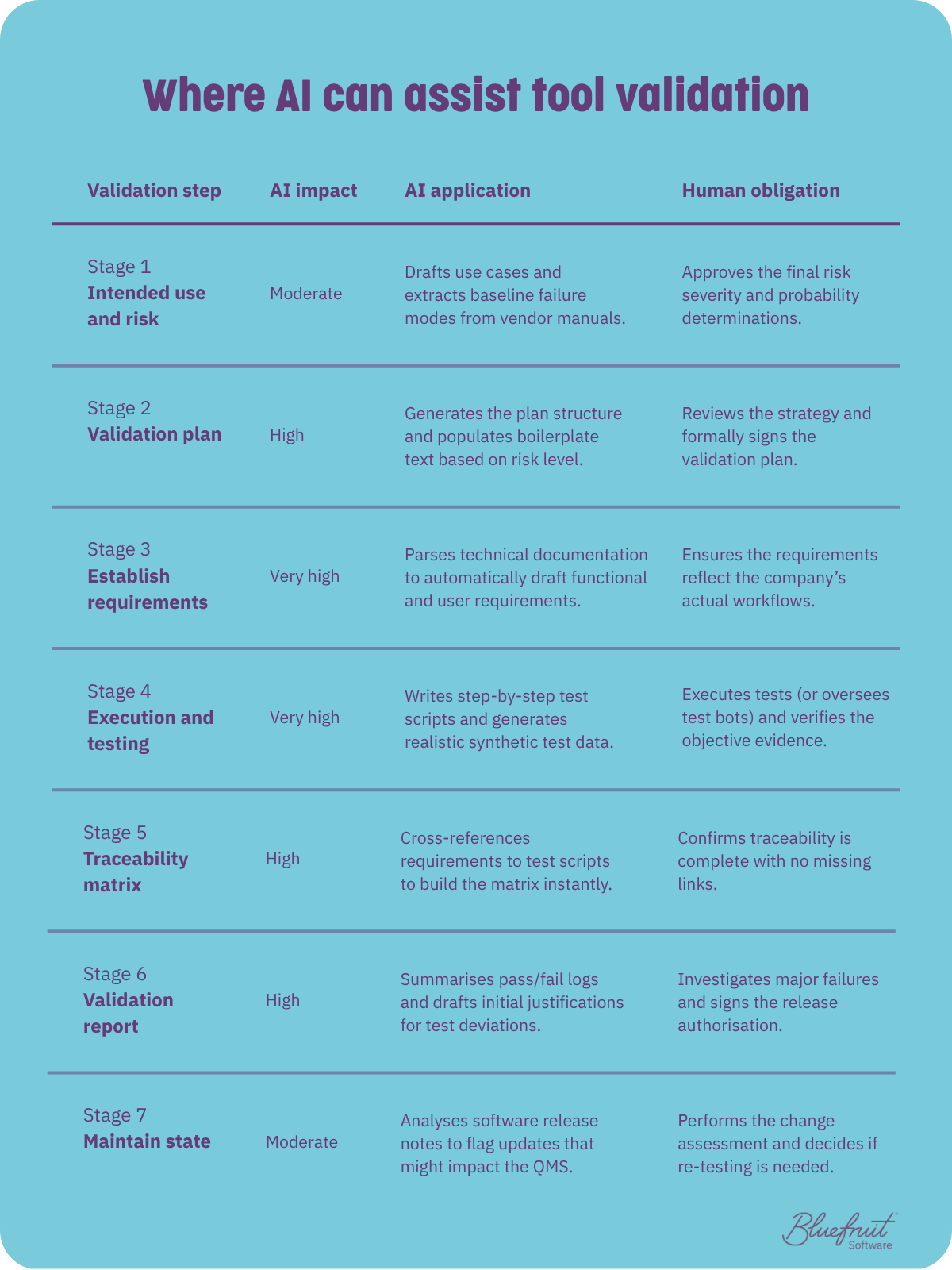
A stage-by-stage breakdown of where AI helps with tool validation, and where the decision stays with a person.
When AI-assisted validation is worse than nothing
A validation that looks complete but is unsound is worse than no validation at all. Picture a traceability matrix where every requirement has an entry, and a validation report that appears thorough and gets signed off. At first glance, nothing about the paperwork looks wrong, which means nobody has a reason to look again. However, if the tests behind those entries don’t test what the requirement calls for, or they gloss over critical caveats, it could lead to significant reputational damage — or worse, device failure.
This is the practical reason “draft, then verify” is non-negotiable in all regulated contexts, rather than simply good manners. A single fabricated data point or hallucinated claim is enough to undermine the credibility of everything around it. Consistency is also hard to bound: an LLM can return different answers to the same input, and a 2025 scoping review of hazard-analysis benchmarks found that existing benchmarks don’t adequately assess whether a model is stable and reproducible enough for safety-critical use in the first place. That kind of inconsistency is fine for a first draft that a human will check. It is disqualifying for an unattended assessment.
Consider these two things before adopting AI for tool validation
Local or cloud
If you’re putting design details and validation evidence through a model, where the model runs matters. A local or self-hosted model keeps sensitive material inside the company boundary, which is relevant both for client confidentiality and for the audit trail. It also gives you more control over version stability, and version stability matters when you may need to reproduce or defend a piece of evidence months later. A cloud model can be the right call for less sensitive work, but it’s a decision to make deliberately, not by default.
The reviewer-cost question
Here’s the check that decides whether any of this is worth doing: if the model saves ten hours of drafting but adds ten hours of oversight, it hasn’t helped you. It has moved the work, not reduced it. For requirements, test scripts and the traceability matrix, the trade is usually favourable: drafting saves real time and checking it is fast, because you’re verifying against ground truth. For intended use and risk, the gap narrows sharply, because checking a risk judgment is nearly as demanding as making one.
AI can multiply capacity, not replace capability
Today, an LLM doesn’t replace the human capability behind good validation, but it can multiply our capacity, and that multiplier only works in the hands of those who already know what good validation looks like. Hand an LLM to a team without that grounding, and you’ve only made bad validation faster.
We’ve tested this directly. In our own research into AI-generated unit tests, hand-written tests beat every model on coverage by a wide margin, but a small share of the AI’s tests covered scenarios the human suite missed entirely. We concluded that an experienced person using AI well outperforms either working alone.
Bluefruit treats LLM output the way we treat any unverified input to a safety argument under IEC 62304 or IEC 61508 – as a draft to be checked, never as evidence.
It can draft, but it can’t sign
Used responsibly, an LLM clears the mechanical, pattern-based work that consumes so much validation effort and frees scarce engineering judgment for the parts that benefit from a human brain. For a team doing nothing today, this is a credible way to start doing something.
However, the moment a model’s output is trusted as evidence instead of verified as a draft, it stops saving time and starts manufacturing risk.

Know you should be validating your tools, but haven't started?
If tool validation is something you know you should be doing and haven’t found a way to start, or you need support with tool validation in safety-regulated industries, tell us about your project.
Did you know that we have a monthly newsletter?
If you’d like insights into software development, Lean-Agile practices, advances in technology and more to your inbox once a month—sign up today!
Find out more